Recipe cards your readers
actually use.
Create beautiful, interactive recipe cards and embed them on Squarespace, Ghost, Substack, Wix, or Kajabi — with one line of code. Scaling, unit conversion, Cook Mode, and SEO schema all built in.
Get early access →Free to join · No credit card · Be first when we launch
Play with it — live
This is a real ForkCard. Switch themes, toggle the hero image, scale servings, flip to metric — everything your readers can do.

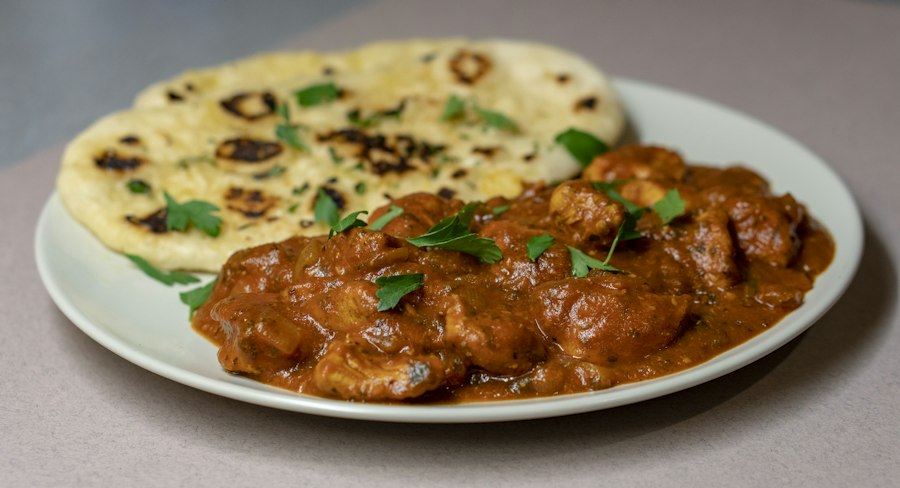
Ingredients
Tap any quantity to scale
Chicken & marinade
- 24⅔ oz boneless chicken thighs(cut into 5 cm pieces)
- 7.1 oz full-fat yoghurt
- 1 tbsp garam masala
- 1 tsp turmeric
- 2 tsp Kashmiri chilli powder
- 1 tbsp ginger-garlic paste
- 1 tsp fine salt
Masala sauce
- 3 tbsp gheeShop
- 1 large onion(finely chopped)
- 4 cloves garlic(minced)
- 1 tbsp fresh ginger(grated)
- 14⅛ oz crushed tomatoes
- 1 tbsp Kashmiri chilli powder
- 1 tsp ground cumin
- 1 tsp ground coriander
- 1 tsp sugar
- 1 cup heavy cream
- 1 tsp garam masala(to finish)
- 1 tbsp cold butter(to finish)
- fresh coriander(to garnish)
You’ll need
- Large cast iron skillet or karahiShop →
- Blender or immersion blender
- Large mixing bowl
* Affiliate links — we may earn a small commission at no cost to you.
Instructions
Marinate
- 1
Mix yoghurt, garam masala, turmeric, chilli, ginger-garlic paste, and salt in a large bowl. Add chicken and toss to coat.
Mix yoghurt, garam masala, turmeric, chilli, ginger-garlic paste, and salt in a large bowl. Add chicken and toss to coat.
- 2
Cover and refrigerate for at least 30 minutes — overnight gives the best flavour.
Cover and refrigerate for **at least 30 minutes** — overnight gives the best flavour.
Char the chicken
- 1
Heat a large skillet over high heat until smoking. Cook chicken in batches 3–4 min per side until deeply charred at the edges. Set aside — it finishes cooking in the sauce.
Heat a large skillet over **high heat** until smoking. Cook chicken in batches 3–4 min per side until deeply charred at the edges. Set aside — it finishes cooking in the sauce.
Build the sauce
- 1
In the same pan, melt ghee over medium heat. Add onion and cook 8–10 minutes until deep golden.
In the same pan, melt ghee over medium heat. Add onion and cook 8–10 minutes until deep golden.
- 2
Add garlic and ginger, cook 2 minutes. Add all dry spices and cook 1 minute until fragrant.
Add garlic and ginger, cook 2 minutes. Add all dry spices and cook 1 minute until fragrant.
- 3
Add crushed tomatoes and sugar. Simmer 15 minutes, stirring, until sauce thickens and oil rises to the surface.
Add crushed tomatoes and sugar. Simmer 15 minutes, stirring, until sauce thickens and oil rises to the surface.
- 4
Add charred chicken. Pour in cream and simmer 5 minutes. Finish with garam masala and cold butter — stir until the butter melts for a silky sauce.
Add charred chicken. Pour in cream and simmer 5 minutes. Finish with garam masala and cold butter — stir until the butter melts for a silky sauce.
- 5
Serve over basmati rice or with warm naan. Garnish with fresh coriander and a swirl of cream.
Serve over basmati rice or with warm naan. Garnish with fresh coriander and a swirl of cream.
Notes
- •Kashmiri chilli gives the signature brick-red colour without too much heat. Swap for sweet paprika + a pinch of cayenne if unavailable.
- •Char the chicken under a high grill/broiler for 2 extra minutes at the end for authentic tandoor smokiness.
- •Freezes perfectly for up to 3 months — freeze before adding the cream, then stir it in when reheating.
- •For a dairy-free version, substitute coconut cream and use oil instead of ghee and butter.
Nutrition (per serving)
- Calories
- 520
- Protein
- 38g
- Carbs
- 18g
- Fat
- 32g
- Fiber
- 3g
- Sugar
- 10g
- Sodium
- 820mg
Free to join · We'll notify you when sign-ups open
Works everywhere you publish
Built for food bloggers. Better than the rest.
Every feature your readers expect — and a few they'll love you for.
Serving scaler
Readers tap any quantity to set their own yield. Fractions and unit-aware math handled automatically.
Metric / imperial toggle
700 g becomes 1½ lb. 180 °C becomes 356 °F. One tap, no page reload, no JavaScript framework required.
Smart ingredient parsing
Type a line like "2 cups flour, sifted" — ForkCard splits quantity, unit, name, and notes automatically.
Cook Mode
Locks the screen on, highlights the current step as readers tap through. Never lose your place mid-recipe.
schema.org / JSON-LD
Every published card injects structured Recipe data into your page head so Google shows your recipe in rich results.
Rich step formatting
Use **bold** for emphasis and [links](url) for cross-references. Renders beautifully in the card.
5 built-in themes
Classic, Editorial, Minimal, Card, and Fun — plus full accent colour control. Matches any blog aesthetic.
Embedded ratings
IP-throttled 5-star ratings submit without a login. Aggregate score updates live on your published card.
Print-perfect layout
The print button triggers a 2-column recipe card — no fiddling with browser print settings, no cut-off text.
Equipment + affiliate links
List required kit with optional affiliate URLs. A "Shop" badge appears inline — tasteful, not spammy.
USDA nutrition lookup
Search 700,000+ USDA foods and auto-populate the nutrition panel. No manual data entry.
White-label embeds
Remove the ForkCard footer and replace it with your own branding. Your readers, your brand.
Bring every recipe with you.
Already on WP Recipe Maker, Tasty Recipes, or Create Cook Manage? ForkCard reads your existing data directly — no manual copy-pasting, no lost ingredients.
Import by URL
Paste any recipe page URL. ForkCard reads the structured recipe data automatically — works with any site that uses schema.org markup.
Sitemap crawl
Point us at your sitemap.xml and bulk-import your entire recipe catalog in one go. Select all or cherry-pick the ones you want.
WP Recipe Maker export
Export your WPRM recipes from WordPress Tools → Export, then upload the XML. Ingredients, instructions, nutrition, images — all preserved.
Tasty Recipes export
Download your Tasty Recipes JSON export file and upload it directly. Sections, timing, and media all come through.
Paste HTML
Copy the embed code from your existing plugin and paste it here. ForkCard extracts the recipe schema from Create Cook Manage, Mediavine, and more.
Plain text paste
No plugin at all? Paste a title, ingredient list, and steps in plain text and ForkCard will do its best to parse them automatically.
Recognised by ForkCard's importer
These platforms embed structured recipe data that ForkCard reads automatically via URL or paste.
Import is available on all plans. Join the waitlist →
Simple, honest pricing
Start free. Upgrade when you need more.
Free
$0
Forever free
- ✓3 recipe cards
- ✓ForkCard branding
- ✓Static nutrition info
- ✓Embed on any platform
- ✓schema.org JSON-LD
Pro
$12
/month or $99/year
- ✓Unlimited recipe cards
- ✓No ForkCard branding
- ✓USDA nutrition lookup
- ✓Embed analytics
- ✓Everything in Free
Studio
$39
/month
- ✓Unlimited recipe cards
- ✓White-label (your brand)
- ✓USDA nutrition lookup
- ✓Advanced analytics
- ✓Everything in Pro
Loved by food bloggers
“I moved off WordPress last year and thought I'd lose all my recipe formatting — WP Recipe Maker obviously wasn't coming with me. ForkCard imported every single card from my sitemap in under ten minutes, and the metric toggle is something my UK readers mention in comments almost every week. I genuinely didn't expect the switch to feel this seamless.”
Priya Sharma
The Masala Diaries · Squarespace
“I tried three other recipe card tools before this one and every single one either broke Ghost's editor or required some horrific workaround. ForkCard is literally just a script tag — paste it, done. Google started showing my recipes as rich results within two weeks of switching, which is the thing that really sealed it for me.”
James Thornton
Proper British Grub · Ghost
“Substack is where my readers are, but I always assumed proper recipe cards were out of reach there. ForkCard proved me wrong — it just works, no hacks needed. The serving scaler has become a thing my readers actually talk about; I get comments every week from people saying they halved a recipe for two or tripled it for a dinner party.”
Sofia Reyes
Cocina con Sofia · Substack
Placeholder quotes — real ones coming soon from beta users.
Questions & answers
Beta access
Join the early-access list
We're onboarding food bloggers one by one. Drop your email and we'll reach out with a personal invite + a free Pro trial.
No spam, ever. Unsubscribe any time.